

You want tools that help you write, design, transcribe, and automate without juggling a dozen subscriptions. The AppSumo Bundle Volume 2: AI Power Pack brings Otter.ai, Lex, Freepik (Essential AI), and Gumloop together so you can prototype workflows and get more done. This matters because consolidating complementary AI tools can speed up content creation, reduce repetitive work, and help you test what actually improves your processes.
If you’re exploring AI for productivity, this bundle lets you try multiple approaches in one place and see which tools move the needle for you.
TL;DR
| Feature | Verdict |
|---|---|
| Ease of Use | ⭐️⭐️⭐️⭐️ – Otter and Lex are easy to pick up; Gumloop may require troubleshooting and more setup ⏱️ |
| Tool Variety | ⭐️⭐️⭐️⭐️ – Covers transcription, long-form writing, AI-generated visuals and automations, useful for many workflows 🎨 |
| Value | ⭐️⭐️⭐️ – Strong experimental value if you plan to use at least a couple of the apps; some components feel more useful than others 💡 |
| Reliability & Access | ⭐️⭐ – Mixed reliability reported: Freepik’s terms and occasional Gumloop glitches are common pain points 🔍 |
| Best For | ⭐️⭐️⭐️⭐️ – Creators, solo founders, and small teams who want to prototype AI-driven content workflows and save time ⏱️ |
AI Power Pack

You get four different AI tools in one bundle — Otter.ai for transcription, Lex for long-form writing, Freepik’s AI plan for images/videos/audio, and Gumloop for simple automations. In day-to-day use you can turn meeting audio into searchable notes with Otter, draft blog posts or book sections in Lex, generate images or short videos with Freepik’s AI credits, and automate repetitive inbox or content tasks with Gumloop. For special projects — product launches, campaign assets, or explainer videos — the bundle helps you move faster by keeping drafting, asset creation, transcription, and basic automation in one place.
It’s a practical package if you want to experiment and speed up workflows without committing to a single full-price subscription, just be mindful of Freepik’s access rules and occasional hiccups reported with Gumloop. Overall, if you’re exploring AI tools and want a taste of several useful apps, this bundle is an easy, low-risk way to try them.
Pros and Cons
| Pros | Cons |
|---|---|
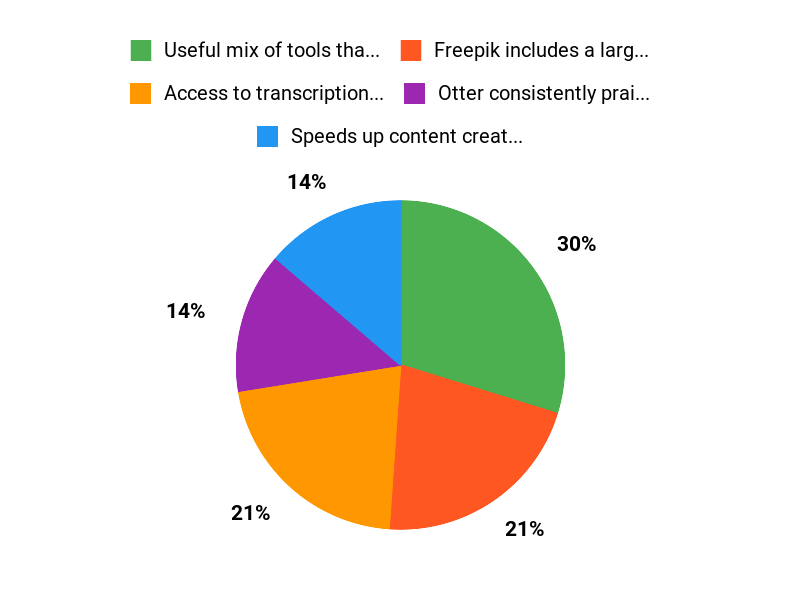
| ✅ Useful mix of tools that cover writing, visuals, transcription, and automation | ❌ Freepik access requires keeping an active subscription to avoid losing plan access |
| ✅ Freepik includes a large one-time allocation of AI credits | ❌ Some users reported Gumloop automations failing or unreliable behavior |
| ✅ Otter consistently praised for meeting transcription and note workflows | ❌ Lex interface could use aesthetic and usability improvements |
| ✅ Good way to try multiple tools without separate full subscriptions | ❌ Inconsistent reliability across apps in the bundle |
What People Say
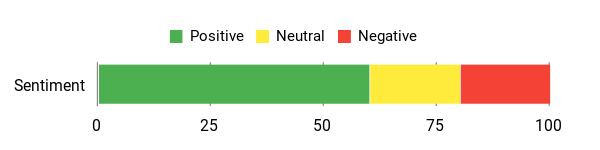
Users praise Otter for reliable transcriptions and highlight Freepik’s large AI credit pool; several users also report Gumloop and Lex bring real workflow value, though there are some usability and access caveats.
Overall Sentiment: Mixed
🗣️ DreamKonnectConsulting
Freepik’s AI plan comes with 84,000 credits — enough to create lots of images, video and audio — and Otter is called out as a standout for transcription. The reviewer also found Lex useful for writing even if the interface could use polish.
🗣️ jacobodysed
Gumloop and Otter delivered real value for this user: Gumloop filled a missing piece in their workflow and Otter was useful for project meeting transcriptions and follow-up prompts.
When It Helps
| Situation | How It Helps |
|---|---|
| Daily Meetings | Use Otter to transcribe and summarize calls so you can skip manual note-taking and quickly turn highlights into tasks or prompts. |
| Content Creation | Draft long-form pieces in Lex, then generate supporting images or short videos with Freepik’s AI credits to create ready-to-publish assets. |
| Email and Workflow Automation | Build simple automations in Gumloop to summarize emails, route content, or trigger follow-up actions after meetings. |
| Campaign or Launch Prep | Rapidly prototype copy, visuals, and audio teasers across the tools to assemble campaign assets without juggling multiple full subscriptions. |
Ease of Use
| Feature | Ease Level |
|---|---|
| Otter.ai | Easy |
| Lex | Moderate |
| Freepik (AI Plan) | Moderate |
| Gumloop | Moderate |
Usability
| Aspect | Ease Level | Notes |
|---|---|---|
| Setup | Easy | Most tools are straightforward to activate, but Freepik requires attention to subscription steps. |
| Learning Curve | Moderate | Lex and Gumloop need time to get the most from templates and workflows. |
| Reliability | Mixed | Otter is reliable; some users reported Gumloop automations stopping unexpectedly and Freepik access nuances. |
| Support | Moderate | AppSumo replies and vendor support have been responsive in reported cases, but issues may still require follow-up. |
Performance & Speed
Generally responsive for transcriptions and text generation; media generation speed depends on Freepik’s processing and can vary.
Integrations
| Software | Integration Quality |
|---|---|
| Otter.ai | Good — works well with meeting platforms and exports for workflows |
| Lex | Basic — strong for drafts and exports but UI could be smoother for collaboration |
| Freepik (AI) | Good — credits let you generate assets, but access rules require care |
| Gumloop | Variable — useful for email and simple automations but some users report reliability issues |
Collaboration
Otter helps teams capture and share transcripts; Lex allows exporting drafts for collaborators; Freepik assets can be shared in project folders; Gumloop can automate notification or summary sharing, but collaboration polish varies by app.
Key Benefits
- Access to transcription, writing, image/video AI, and basic automation in one bundle
- Speeds up content creation and meeting follow-up work
- Good for testing multiple AI tools without long-term commitment
- Freepik AI credits let you generate many visuals and audio assets
Rating: 3.6 (total: 75+)
FAQ
What Is Included In The AI Power Pack And Who Is It Best For?
The bundle combines access to Otter.ai for transcription, Lex for long‑form writing and editing, Freepik’s Essential AI Plan with 84,000 AI credits for image, video and audio generation, and Gumloop for building simple automations. You get one‑year access to these tools, so it’s aimed at productivity seekers who want to write, design, transcribe, and automate without stitching many single‑use tools together.
If you create content, run meetings, prototype workflows, or want to speed up repetitive tasks you’ll likely find high value here; if you only need a single very specific feature long term, check the tool limits and how they fit your workflow before committing.
How Do I Activate And Use Each Tool Effectively?
Start by following the activation instructions in your AppSumo purchase email and use the same address when possible to avoid account conflicts. Test each tool early so you understand limits and integration paths: use Otter.ai to capture meeting audio and export transcripts, then feed those transcripts into Lex to create drafts, summaries, or prompts; use Freepik AI credits for batch image or short video generation but monitor credit spend; use Gumloop to prototype one simple automation first and confirm it runs reliably before making it mission‑critical. Always export important work as you go, keep documentation of activations, and consult each vendor’s setup guides or support if something behaves differently than expected.
What Should I Know About Privacy, Limitations, And Getting Help If Something Goes Wrong?
Each vendor has its own data and access policies, so review their privacy statements and be cautious about what you upload. Some partners may require an active account to maintain access to features you redeemed through the bundle, and certain items are credit‑based so you should track usage to avoid surprises. If you lose access or see unexpected behavior, keep your purchase confirmation and the email you used to sign up, then reach out to vendor support first and provide those details; if the issue isn’t resolved, contact AppSumo support with the same documentation. As a practical tip, export transcripts, images, and templates you care about regularly so you retain control of your work regardless of changes to service terms.
Why Users Love It
You love AppSumos AI Power Pack because it bundles powerful, practical AI tools into one affordable package that helps you automate repetitive tasks, generate content faster, and streamline workflows without juggling multiple subscriptions. Its intuitive interfaces, ready-made templates, and easy integrations give you immediate productivity gains with minimal learning curve, so you can focus on results instead of setup.
Wrapping Up
If you want to experiment with AI for everyday productivity, the AI Power Pack is a practical way to access transcription (Otter), writing tools (Lex), AI image/audio/video credits (Freepik Essential AI), and automations (Gumloop) in one bundle. You’ll likely find clear winners depending on your needs — Otter and Gumloop earn frequent praise, while Freepik’s access rules and occasional Gumloop hiccups are important caveats to watch for.
Approach this as a toolkit for testing workflows: you can discover what saves you time, but be prepared to verify access terms and contact support if integrations act up. If your goal is rapid experimentation and streamlining content tasks, this pack can help you get there.
This Article is reader-supported. When you click through links we may earn a referral commission on qualifying purchases.